How to Connect with USB
USB is the fastest and most stable way to use VirtualTablet. Both iPhone/iPad and Android devices can connect over a cable, but the setup is different for each — pick your device to see the steps.
Why Use a USB Connection?
- Lowest latency - Direct connection without network delays
- Maximum stability - No WiFi interference or dropouts
- Better battery life - Your device charges while in use
- Enhanced security - Nothing travels over your network
⚡
USB connection is recommended for professional work requiring precise, real-time stylus response.
What You Need
Everyone needs a USB data cable (the one that came with your device works best), VirtualTablet Server on the PC, and the VirtualTablet app on the tablet. Beyond that, only Windows requires a manual install:
| Your device | Windows PC | Mac | Linux |
|---|---|---|---|
| iPhone / iPad | Apple Devices (free) or iTunes | Nothing to install | usbmuxd, installed with the server package |
| Android | Manufacturer USB driver | Nothing to install | adb, installed with the server package |
💡
On Windows and Mac you do not need to install ADB or Android platform-tools - VirtualTablet Server already
includes everything it needs to talk to an Android device. On Linux the server uses your distribution’s own
adb and
usbmuxd packages, and the recommended install command pulls both in for you. If either one is
missing, the server’s USB tab shows the exact command to install it.Where to Look on the PC
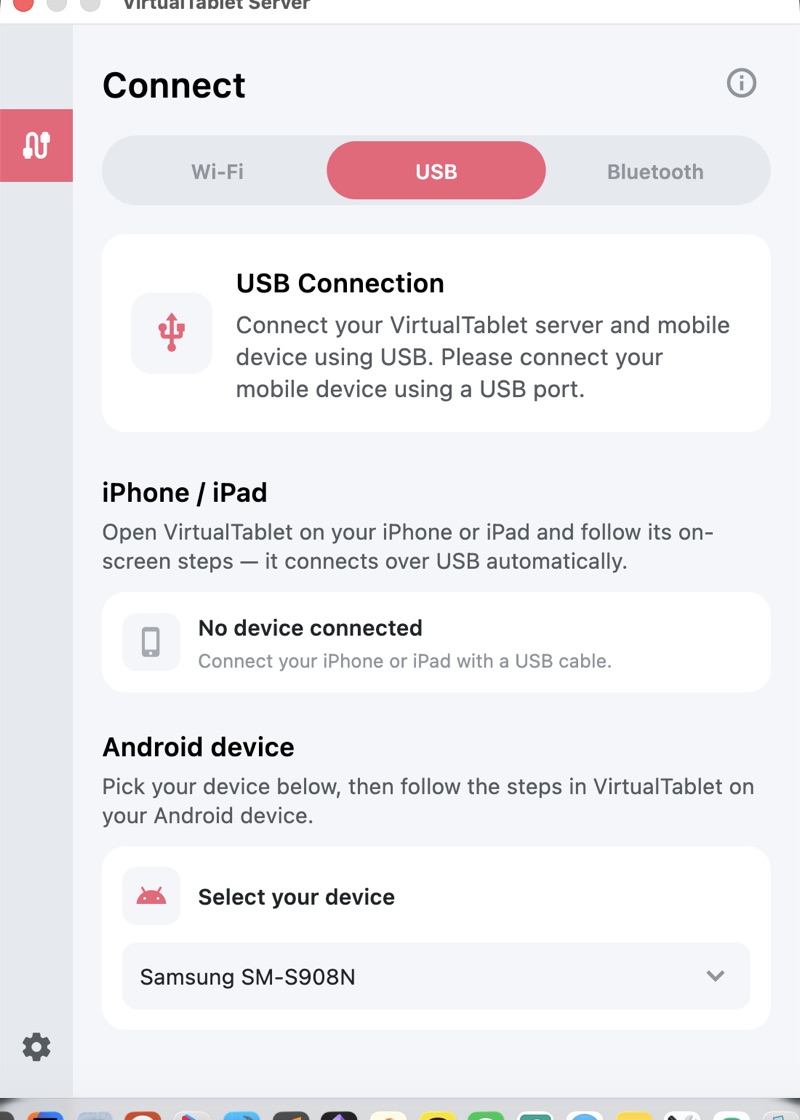
On the PC, everything happens in one place: open VirtualTablet Server, go to the Connect tab, and switch to USB. There is a section for each device family, and each one shows what it currently sees over the cable.
Tips for the Best USB Performance
- Use the cable that came with your device, or another high-quality data cable - many spare cables are charge-only
- Connect directly to your PC instead of through a USB hub
- If a port acts up, try a different one before blaming the cable
USB vs WiFi Comparison
| Feature | USB Connection | WiFi Connection |
|---|---|---|
| Latency | Minimal | Varies with the network |
| Stability | Excellent | Good |
| Setup Complexity | Easy on iPhone/iPad, medium on Android | Easy |
| Mobility | Limited by cable | Free movement |
| Battery Usage | Charges device | Drains battery |